New State Machine Decoder: Debug Your State Machines with Ease

Debugging state machines can be challenging, especially when you're trying to understand complex state transitions in real-time hardware. We're pleased to announce significant enhancements to ScanaStudio's State Machine decoder, making it easier than ever to visualize and analyze state machine behavior captured with your logic analyzer.
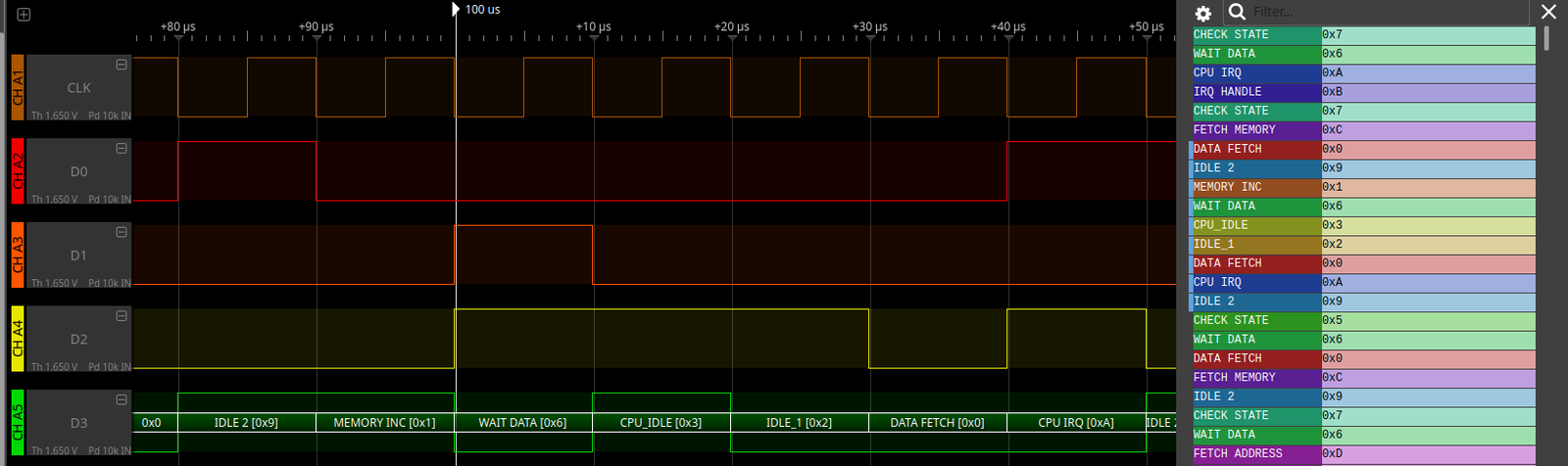
What is the State Machine Decoder?
The State Machine decoder is a specialized protocol analysis tool that interprets parallel digital lines representing state machine outputs. Instead of seeing cryptic binary or hexadecimal values, you can assign meaningful names to each state and watch your state machine transitions unfold in human-readable form.
Key Features
Flexible Bit Width Configuration
The decoder supports state machines with 1 to 8 bits of parallel state outputs, accommodating systems with anywhere from 2 to 256 possible states. Simply assign the appropriate channels to your state bits, and the decoder handles the rest.
User-Defined State Names
One of the most powerful features is the ability to assign custom names to each state. Instead of seeing "State 0x05" in your decode results, you could see "IDLE", "READING", "PROCESSING", or whatever names match your actual state machine design. This makes analysis intuitive and eliminates the need for constant lookups in design documentation.
Import State Names from Files
For complex state machines with many states, manually entering state names can be tedious. The decoder supports importing state names from a TXT file, allowing you to:
- Maintain state definitions alongside your source code
- Share state definitions across your team
- Quickly update state names when your design changes
- Document your state machine externally
Simply prepare a text file with your state mappings and import it directly into the decoder configuration.
Clockless Mode with Edge Detection
Not all state machines use a dedicated clock output. The enhanced decoder now includes a clockless mode that uses edge-based transition detection. In this mode, the decoder automatically detects when state bits change and records the transition—no clock signal required.
This is particularly useful for:
- Asynchronous state machines
- Systems where the clock signal isn't accessible
- State machines with irregular update patterns
- Gray code or one-hot encoded states
Configurable Debounce Buffer
To handle noisy signals or eliminate spurious transitions, the decoder includes a configurable debounce buffer. This feature filters out glitches and ensures you only see genuine state transitions, making your analysis cleaner and more accurate.
Real-World Applications
The State Machine decoder excels in numerous debugging and verification scenarios:
Embedded Systems Development
- Firmware State Machine Debugging: Verify that software state machines behave as expected
- Driver Development: Analyze device driver state sequences during initialization and operation
- Power Management: Track power state transitions and verify proper sequencing
- Communication Protocols: Debug custom protocol state machines
FPGA and CPLD Development
- HDL Verification: Validate synthesized state machines against specifications
- Timing Analysis: Identify unexpected state transitions or timing violations
- State Encoding Verification: Confirm one-hot, binary, or Gray code implementations
- Controller Logic: Debug complex control state machines in digital designs
Hardware Design Validation
- State Machine IC Testing: Verify behavior of dedicated state machine chips
- Sequencer Debugging: Analyze initialization and control sequences
- Fault Detection: Identify illegal states or unexpected transitions
- Race Condition Analysis: Spot timing issues causing incorrect state behavior
System Integration
- Multi-Component Synchronization: Verify coordinated state machines across multiple ICs
- Bus Protocol Analysis: Decode bus controller state machines
- Handshaking Verification: Confirm proper state transitions during component interactions
- Error Recovery Testing: Validate state machine behavior during fault conditions
Education and Training
- Digital Design Labs: Demonstrate state machine concepts with real hardware
- Computer Architecture: Show processor control unit state sequences
- Algorithm Visualization: Display algorithm progress through distinct states
- Design Verification: Teach proper validation techniques for sequential circuits
Getting Started
The enhanced State Machine decoder is available now in ScanaStudio. Here's how to use it:
- Capture Your Data: Connect your logic analyzer to the parallel outputs of your state machine
- Launch the Decoder: Select "State Machine" from ScanaStudio's decoder list
- Configure Bit Width: Set the number of parallel bits (1-8)
- Assign Channels: Map logic analyzer channels to state bits
- Choose Operation Mode:
- Clock mode: Assign a clock channel for synchronous sampling
- Clockless mode: Enable edge-based detection of state transitions
- Define State Names:
- Enter names manually for each state, or
- Import state names from a prepared TXT file
- Set Debounce (optional): Configure debounce buffer if needed for noisy signals
- Decode: Run the decoder to see your state transitions with meaningful names
The decoder will display state transitions in the timeline view and list all state changes with timestamps in the decode table, using your custom state names for easy interpretation.
Tips for Best Results
- Use Descriptive Names: Choose state names that clearly indicate functionality
- Document State Files: Keep your state name TXT files in version control alongside your design
- Adjust Debounce: Start with minimal debouncing and increase only if you see spurious transitions
- Clockless for Async: Use clockless mode for asynchronous or self-clocked state machines
- Gray Code Consideration: For Gray-encoded states, ensure you're capturing all bits accurately
Conclusion
The enhanced State Machine decoder transforms cryptic parallel data into meaningful state information, dramatically simplifying the debugging and verification of sequential logic. With features like clockless operation, custom state naming, file import capability, and high-performance decoding, it's an essential tool for anyone working with state machines.
Whether you're debugging embedded firmware, verifying FPGA designs, or teaching digital logic concepts, the State Machine decoder provides the visibility you need to understand state transitions at a glance.
Download the latest version of ScanaStudio and experience the power of intuitive state machine analysis!
Have questions or want to share how you're using the State Machine decoder? Contact our team – we'd love to hear about your projects.