The ScanaStudio SDK: Everything the Window Does, From Python, NodeJS, Rust or C

There is an email we get about once a month. The wording changes, the question does not: "Can I run this from a script?"
For years the honest answer was "sort of." We had the IHWAPI, one C library per device family, and it could open a device and hand you raw transitions. The decoding, the triggers, the measurements, everything that makes ScanaStudio useful, you had to rebuild yourself. A few brave people did. Most people, quite reasonably, did not.
With V6 the answer is yes. In Python, NodeJS, Rust or C. With every feature the window has, not a reduced automation subset.
Read the SDK documentationOne Interface, Two Kinds of Client
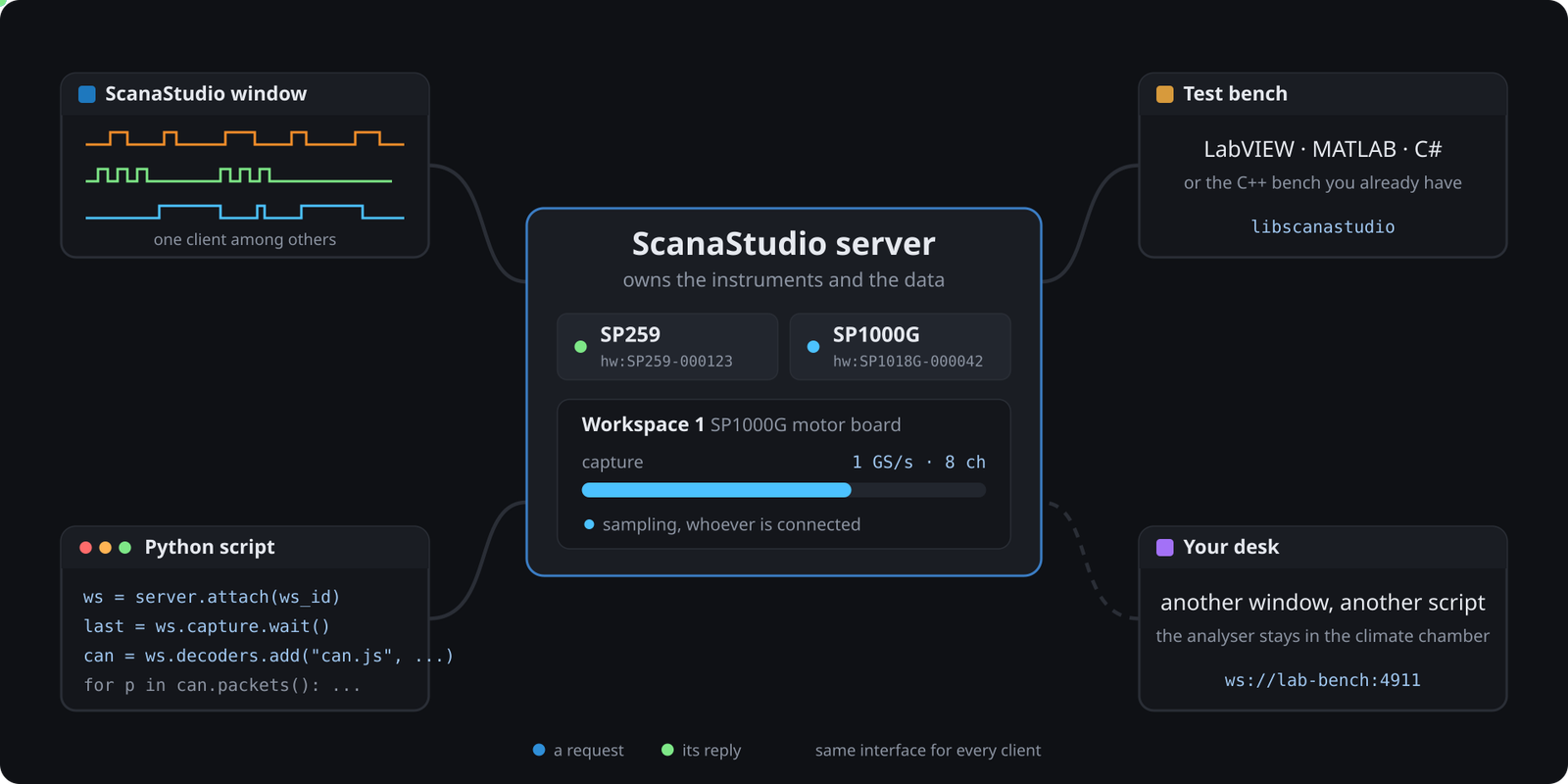
ScanaStudio V6 is split in two. A server owns the instruments and the data. Clients talk to it. The ScanaStudio window is one of those clients. Your script is another one, and it uses exactly the same interface.
That sentence is the whole design, so let me spell out what it buys you. There is no second, smaller API for automation that lags behind the application. When a decoder gains an option, your script sees it. When we add a trigger mode, your script can arm it. The window and the SDK are two front ends on one engine.
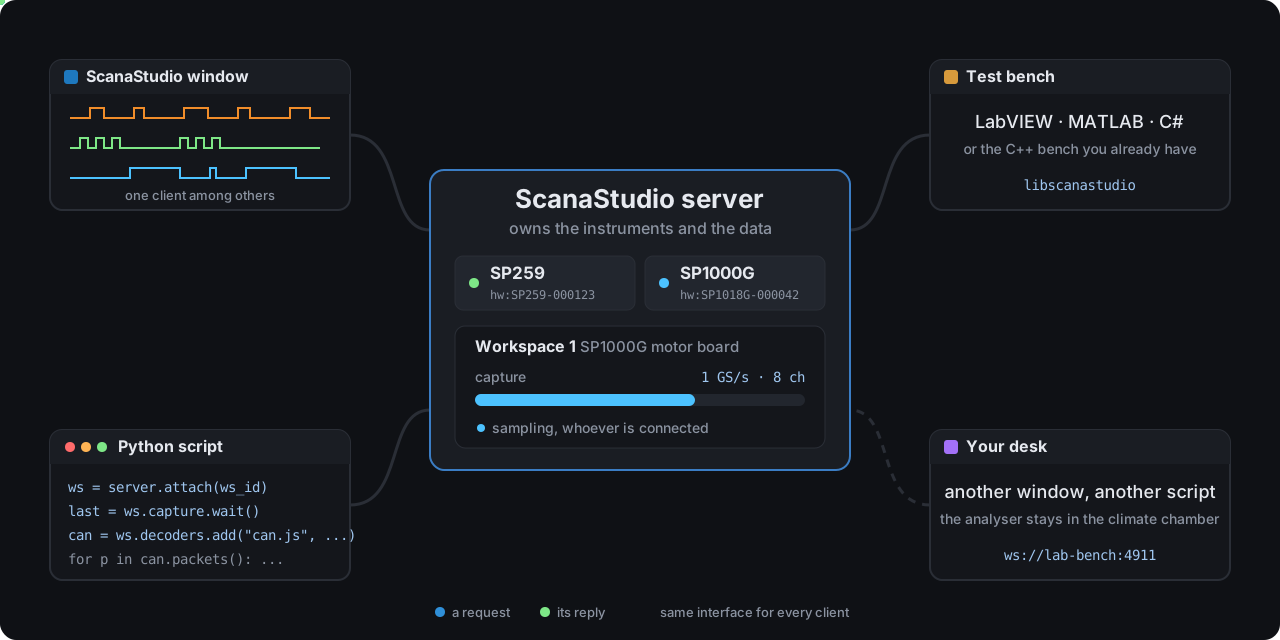
One server, many clients. Watch the Python script drop off: the capture on the server does not care.
There are four client libraries, all MIT-licensed, all released together under one version number: ikalogic-scanastudio on PyPI, @ikalogic/scanastudio on npm, scanastudio-client on crates.io, and a C library you download as one archive. The C library is the route for LabVIEW, MATLAB, C# and the C++ test bench you already have. They call a C function; they never have to know there is a WebSocket underneath.
pip install ikalogic-scanastudio
npm install @ikalogic/scanastudio
cargo add scanastudio-client
Ten Lines, No Hardware Needed
Every server offers demo devices, so you can try the SDK before the analyser is even on your desk. This is the shortest complete program:
from ikalogic_scanastudio import ScanaStudio, Trigger

with ScanaStudio.connect() as server:
    workspace = server.create("se254")        # a demo SE254, no hardware
    last = workspace.capture.run(
        samples=1_000_000,
        sample_rate=25_000_000,
        trigger=Trigger.immediate(),
    )
    print(f"captured {workspace.capture.seconds(last):.3f} s")
    edges = sum(1 for _ in workspace.data.transitions(channel=0))
    print(f"channel 0 holds {edges} transitions")
    workspace.close()
Start ScanaStudio, or the scanastudio-server binary it installs, run the script, and you get:
captured 0.040 s
channel 0 holds 191 transitions
Swap "se254" for "hw:SP259-000123" and the same program runs on the real thing. The quickstart shows this program in all four languages.
Watch It, Then Write It
Here is a V6 session on an SP1000G wired to a motor-control board. A trigger on the CAN line, a capture, the CAN and SPI decoders, the tachometer turned into a frequency plot, the Packet view filtered on one identifier, and a measurement between two markers.
Every click in this animation is one call in the SDK.
Now the same session, without the mouse:
from ikalogic_scanastudio import ScanaStudio, Trigger

CAN_RX = 0    # CH1
TACHO = 5     # CH6

with ScanaStudio.connect() as server:
    ws = server.create("hw:SP1018G-000042")   # or "sp1018" for the demo device

    # Arm on the first falling edge of CAN RX, keep 10 % of history.
    last = ws.capture.run(
        samples=8_000_000,
        sample_rate=1_000_000_000,
        trigger=Trigger.falling(channel=CAN_RX, position=0.1),
    )

    # The decoder is the same can.js the window uses.
    # Options are keyed by id or by the caption you see in the dialog.
    can = ws.decoders.add(
        "can.js",
        {"CAN channel": CAN_RX, "Bit rate": 500_000},
        wait=True,
    )

    # The filter box, in code: keep the frames from identifier 0x1A3.
    frames = [p for p in can.packets() if p.content == "0x1A3"]
    print(f"{len(frames)} frames from 0x1A3")

    # Two markers on the tachometer, and the frequency between them.
    a = ws.markers.add(sample=1_000_000)
    b = ws.markers.add(sample=3_500_000)
    ws.measures.add(a, b, channel=TACHO, kinds=["frequency", "edges"])
    for measure in ws.measures.wait(timeout=60.0):
        for result in measure.results:
            print(result.kind, result.value)

    ws.save("/captures/motor-board.scana")
    ws.close()
What the mouse did in two minutes, the script does in one screen. And the script does it the same way at 3 a.m., on the hundredth board, without getting bored.
Decoders are scripts, so the SDK does not pretend to know their options in advance. Ask with workspace.decoders.options("can.js") and it lists every option with its id, its caption, its type and its default. That is the same list the dialog is built from.
What People Will Build With It
We wrote the guides around the requests that filled that monthly email.
An end-of-line tester. Arm a trigger, capture the board, decode the bus, check what came out, exit with a code. Zero for pass, one for a bad board, two for a bench fault such as an unplugged analyser. That last one matters: a CI job that cannot tell "the board failed" from "the analyser was missing" will happily pass bad boards.
A firmware regression job. The same program, run by your CI on every commit, failing the build when the I2C bus starts NACKing. The failing capture is saved as a .scana you open in ScanaStudio afterwards.
A headless datalogger. Start a capture, let the script exit, go home. Come back in the morning, attach to the workspace, and read what happened overnight. The datalogger guide is a two-part script for exactly that.
Decode and export. Run a decoder and pull the packets into a spreadsheet, a pandas frame or a report. Or ask the server for a CSV directly.
Stimulus and capture together. On an SP1000G, the pattern generator is in the SDK too. Drive the bus and watch the answer in the same program.
The Instrument Stays Where It Is
The server and the client do not have to share a machine. Install ScanaStudio on the PC next to the climate chamber, run scanastudio-server there, and connect from your desk or from the CI runner. Several clients can talk to one server at the same time, so a script and a ScanaStudio window can watch the same capture. You watch, the script counts.
One honest note. The protocol has no authentication, and that is why the server listens on localhost only by default. When you open it to the network, put an SSH tunnel or a VPN in front of it. The remote guide explains the options.
If You Have IHWAPI Code
It keeps working. The IHWAPI stays available for existing projects, but it will not gain features. New work should use the SDK, and the migration page maps each old call to its replacement.
The short version of why:
| IHWAPI | ScanaStudio SDK | |
|---|---|---|
| Languages | C, and whatever can call a C ABI | Python, NodeJS, Rust and C |
| Protocol decoding | None, raw transitions only | Every ScanaStudio decoder |
| Triggers | Basic only | Edge, logic, pulse, multi-step, external, A/B sequences |
| Remote | Local USB only | Any machine on the network |
| Session lifetime | Dies with your process | Lives on the server, rejoin any time |
Where It Stands Today
The SDKs are at version 0.2.5 and shipped with ScanaStudio 6.0.13 as preliminary support. All four libraries cover the same ground: devices, workspaces, captures, every trigger type, transitions, decoders and their packets, hex view, markers and measurements, the pattern generator, saving and CSV export. What they deliberately leave to the window is drawing waveforms, the server's own settings and firmware updates.
It is young, and it is in your hands early on purpose. If a call does not behave the way the documentation says, tell us. That is how the next 0.2.x gets better.
Conclusion
Until now the ScanaStudio window was the only comfortable way in. Now your script gets the same seat at the table.
Capture, trigger, decode, measure, generate, save, export, from wherever the instrument happens to be. The monthly email finally has a one-word answer.
Read the SDK documentation Download ScanaStudio V6 Contact us with your questions