Protocol Triggers From Code: Arm an SP259 on an I2C Address or a UART Byte
We are often asked about protocol triggers: starting a capture on an I²C address, or on one particular byte going by on a UART line. It is a powerful feature, and also one that can feel a little complex to use, especially from the SDK.
So here is the whole picture: how to set one up from your own code in a few lines, what happens underneath, and what it looks like on a real bench.
Read the SDK documentationA Protocol Trigger in a Few Lines
A protocol trigger comes from a decoder. You attach the decoder you would use to read the bus anyway, and ask it for a trigger:
from ikalogic_scanastudio import ScanaStudio

with ScanaStudio.connect() as server:
    device = next(d for d in server.devices() if not d.demo)
    ws = server.create(device.key)

    # SCL on CH1, SDA on CH2
    i2c = ws.decoders.add("i2c.js", {"ch_scl": 0, "ch_sda": 1})
    trigger = i2c.trigger({"trig_addr": "0x41"}, position=0.5)

    ws.capture.run(samples=2_000_000, sample_rate=25_000_000, trigger=trigger)
    i2c.wait()
    for item in i2c.items():
        print(item.start, item.content)
    ws.close()
The capture waits until a frame addressed to 0x41 goes by, then records 40 ms before it and 40 ms after it. The UART version is the same three lines with uart.js:
uart = ws.decoders.add("uart.js", {"ch": 0, "baud": 115_200})
# 'Z', or "0x5A", or "90"
trigger = uart.trigger({"trig_byte": "'Z'"}, position=0.5)
and {"trig_phrase": "OK"} triggers on a string instead of a single byte.
What Happens Underneath
There is no I²C or UART logic in the SP259's FPGA, and that is on purpose. What the FPGA has is a general step engine: a sequence of up to 128 steps, each one a set of levels or an edge, each one optionally inside a time window measured from the step before.
The protocol knowledge lives in the decoder script, the same i2c.js and uart.js that decode the bus in the ScanaStudio window. When a capture starts, the server asks the script to describe the frame you want as a list of edges and timings. A start condition, seven address bits sampled on SCL, a read or write bit. Or a start bit, eight data bits and a stop bit, each edge at a whole number of bit times from the last one. The server compiles that list into step words and loads them into the engine.
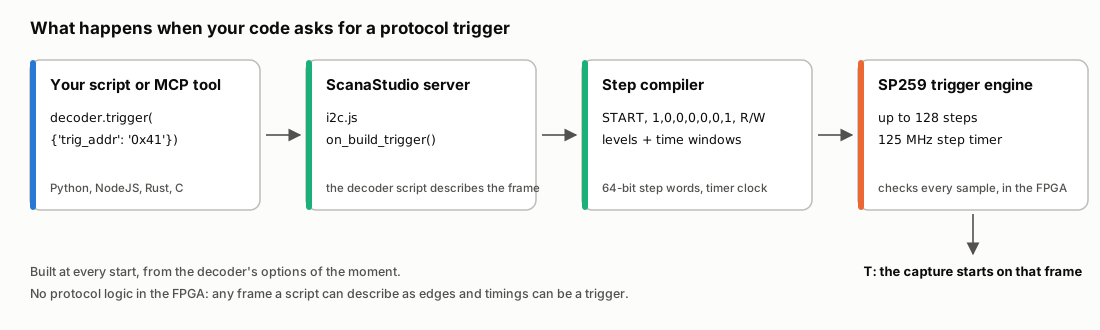
The trigger is built at every capture start, from the decoder's options of the moment.
Two things follow from that design. First, any decoder whose script knows how to describe a frame can offer a trigger, and decoder.can_trigger tells you which ones do. Second, the SDK does not need to know anything about I²C or UART. It asks the script what its trigger takes:
for option in uart.trigger_options():
    print(option)
trig_alt: Select trigger type (selectable_containers) one of ['Trigger on any valid frame', 'Trigger on specific word', 'Trigger on a characters string'] = 'Trigger on any valid frame'
trig_byte [Trigger on specific word]: Trigger word (text_input) = ''
trig_phrase [Trigger on a characters string]: Trigger phrase (text_input) = ''
That list is everything a protocol trigger takes, with its captions and choices. Hand it to a form, a test sequencer or an AI agent, and it can fill the trigger in without knowing how the protocol looks on the wire.
On the Bench: I²C
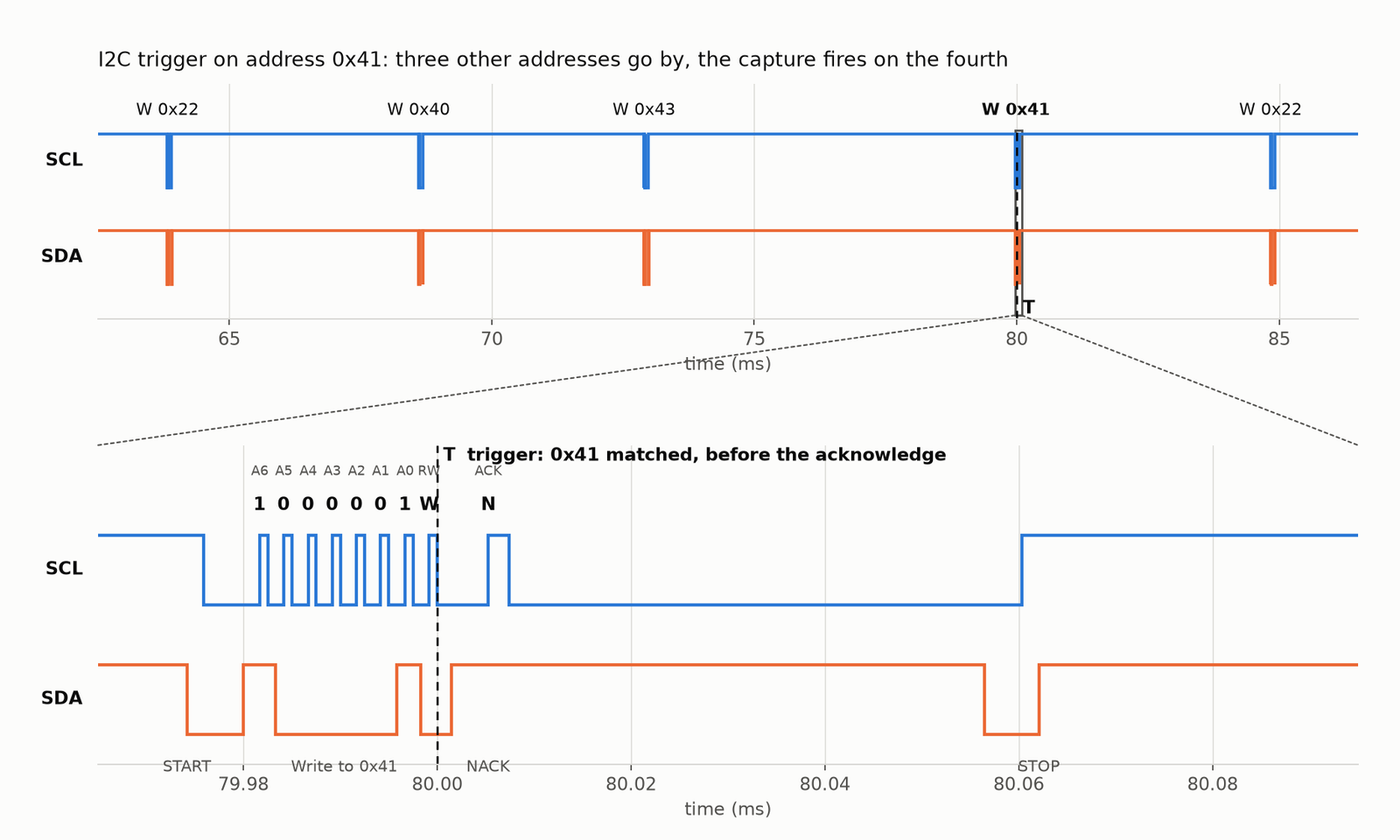
To check this properly we put an SP259 in front of an AT1032S, which happily plays I²C master, and had it write to four addresses in a row: 0x22, 0x40, 0x43, then 0x41. The trigger was set on 0x41.
The image at the top of this post is that capture. The three other addresses go by, the capture fires on the fourth. Zoom in and you can read the address bits as the receiver reads them, on each rising edge of SCL: 1000001, a write, then a NACK, since no device was actually listening.
The T marker sits right after the read/write bit. That is where the steps end, so that is where the engine fires: as soon as the address is certain, before the acknowledge. If you only want frames a device acknowledged, tick trig_chk_ack and the trigger waits for the ACK too.
We ran it at 100 kHz, 400 kHz and 1 MHz, with reads and writes to the same address to check the access type. It fires on the right frame every time, and stays armed when the address never shows up.
On the Bench: UART
Same setup, the AT1032S as a UART at 115200 baud, sending "hello ", then a "Z", then " OK".
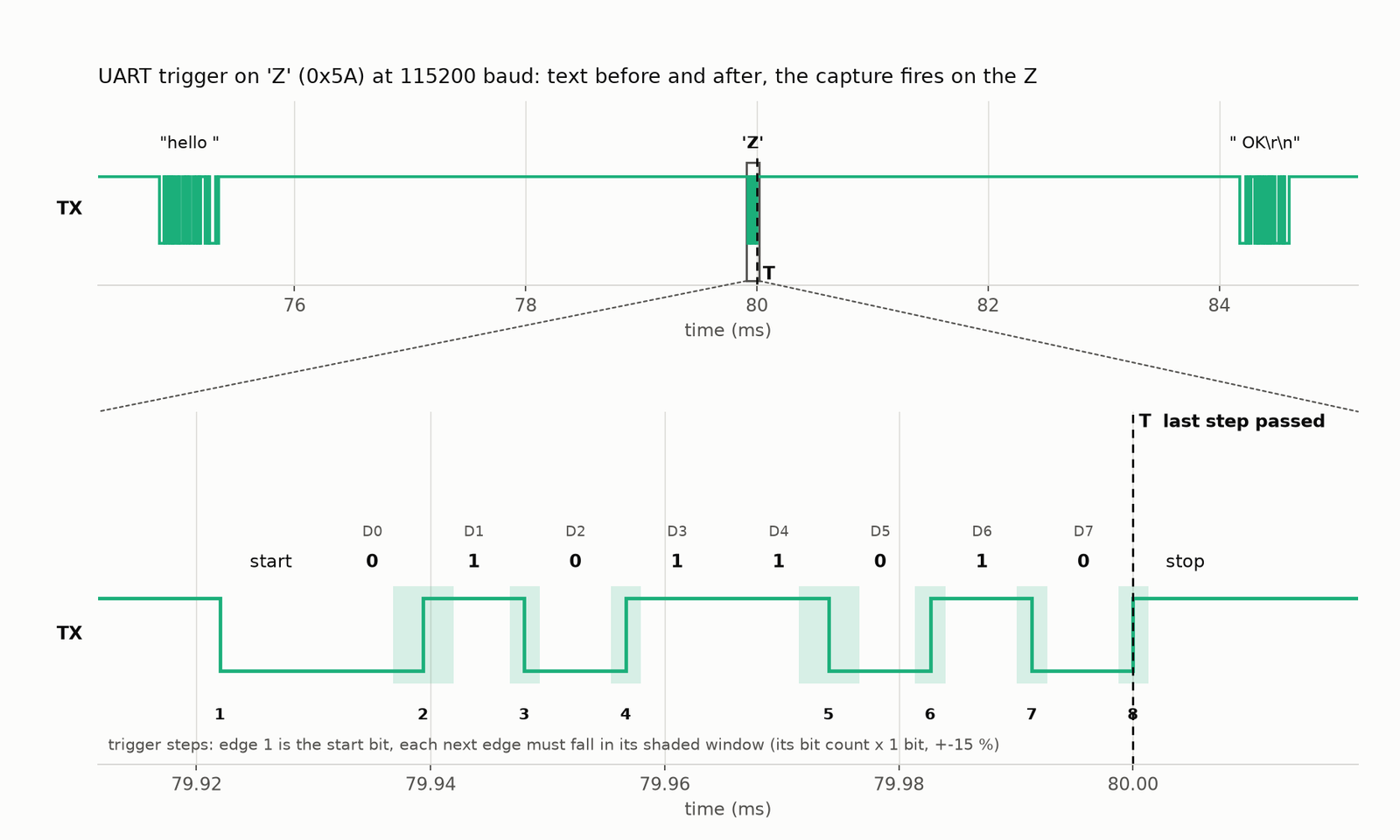
Each edge of the 'Z' must fall inside its shaded window, plus or minus 15 % of its distance in bits from the previous one.
The zoom shows how a UART byte becomes steps. Edge 1 is the start bit. Every next edge must arrive a whole number of bit times after the previous one, within plus or minus 15 %. When the eighth edge lands in its window, the 'Z' is confirmed and the capture fires. We checked 9600, 115200 and 1 Mbaud, the byte written as 0x5A, 90 and 'Z', and the phrase trigger.
Conclusion
A protocol trigger from code takes three lines: add the decoder you would use to read the bus, ask it for a trigger, and pass that trigger to the capture. The decoder script knows the protocol, the SP259 runs the trigger in hardware, and the SDK describes every option.
That last point makes it a good fit for automation, including AI agents. Wrap trigger_options() and a capture call as two tools, for example in an MCP server, and an agent can read what a trigger takes, fill it in and arm the analyser, without ever knowing how an I²C address is laid out on the wire.
Read the SDK documentation - Download ScanaStudio V6 - Contact us with your questions