ScanaStudio V6: We Rebuilt It From the Ground Up. Here Is What Changes for You

Every version of ScanaStudio until now was one program. It owned the USB cable, it owned the samples, and it owned the window. Close the window, and the capture went with it. Want to look at the analyser sitting on the bench in the next room? Walk.
That worked for a long time. It also quietly blocked most of the things people kept asking us for.
So we did the thing engineers are told never to do. We started over.
ScanaStudio V6 is a new server written in Rust, a new interface, and one download for Windows, Linux and macOS. This post is about what that changes for you, not about how we built it.
Download ScanaStudio V6Why We Threw the Old One Away
The requests came in three flavours, over and over. "Can I drive it from a script?" "Can the analyser be on another PC?" "Can two of us look at the same capture?"
Each one, on its own, could have been bolted onto the old application. Together, they all pointed at the same root cause: one process holding the device, the data and the screen at once. You cannot share what one window owns.
V6 splits that in two. A server owns the instruments and the captures. Clients talk to it. The ScanaStudio window you open is one of those clients. A script is another. A second window on another machine is a third. That one decision answered all three questions at once, and it is the reason this is a V6 and not a V5.9.
What You Notice in the First Five Minutes
The first thing you see is the home screen. It is a wall of your devices, real ones and demo ones, and you click the one you want.
Settings are found by name instead of by tab. Type what you are looking for and there it is, with a line explaining what it does. Nobody should have to remember which tab we hid something under in 2019.
The waveform can be driven from the keyboard. Zoom and pan without reaching for the mouse.
There is a signal overlay. Draw on top of a capture, annotate what you see, then keep it or throw it away. It sounds like a small thing. It replaces a lot of screenshots pasted into emails.
On Windows, the application installs per user and never asks for administrator rights. The only installer that still does is the USB driver package, and you run that once. Updates take care of themselves: a banner appears, you read the release notes, you say yes, and the new version installs and restarts.
And if it ever crashes, it writes a report you get to read before deciding whether to send it. Your "no" is respected.
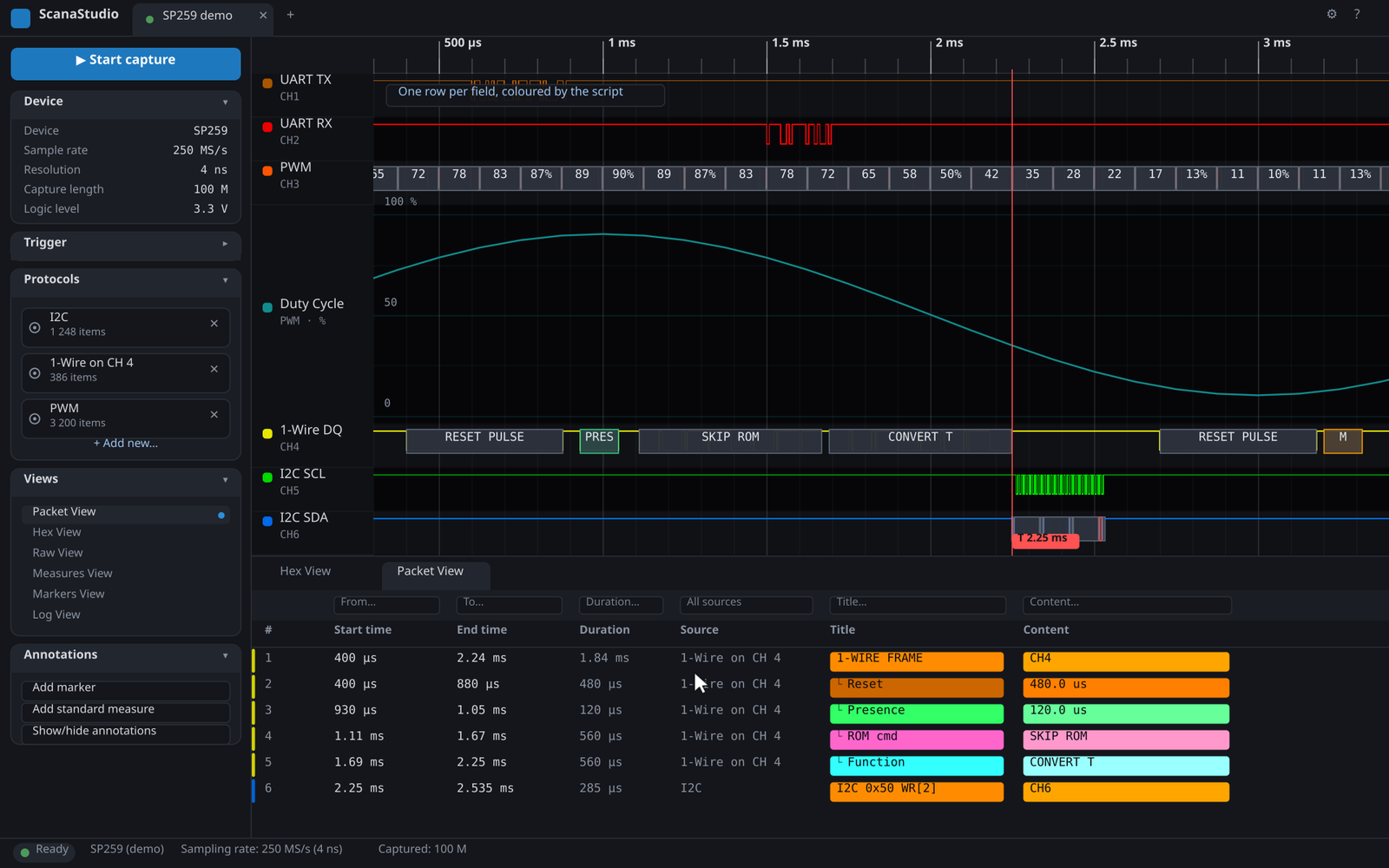
A V6 session on an SP259: capture, the I2C and 1-Wire decoders, a PWM turned into a duty-cycle plot, the Hex and Packet views, a filter, two markers and a measurement.
The Capture Does Not Belong to the Window Anymore
This is the change I care about most, because it changes how you work rather than what you click.
In V6, a capture lives on the server. Close the window, and it keeps running. Open the window again, and it is still there, still sampling, exactly where you left it. Closing the window on a Friday evening no longer means a lost weekend of data logging.
Two windows can watch the same capture. So can a window and a script. One of you zooms in on a glitch while the other exports the packets, and neither steps on the other.
And the window can talk to a server on another machine. Leave the analyser and the board under test in the climate chamber, or in a rack in another building. Install ScanaStudio on that machine, point your own window at it, and work from your desk. The instrument stays where the problem is.
And the Same Door Is Open to Your Code
Because the window is just one client, we could give your programs the same access. The ScanaStudio SDK talks to the same server, with the same interface, from Python, NodeJS, Rust or C. Capture, trigger, decode, measure, generate patterns, save, export. If the window can do it, your script can do it.
That deserves its own post, so it has one: the ScanaStudio SDK, everything the window does, from code. The short version is on the SDK documentation page.
Getting It
V6 supports the SP209, the SP259 and SP259i, the SP1000G series and the SE254. If you own one of those, the download page has the Windows setup, the Linux tarball and the macOS disk image, with checksums.
A few practical notes:
- On Windows, install the USB driver package once before you plug in the device. It is a separate download on the same page.
- On macOS, the disk image is signed but not yet notarized, so the first launch is a right-click and Open.
- ScanaStudio V5 is not going anywhere. It keeps its own download page and release notes, and it will keep working with your existing files.
We are shipping updates every few days at the moment, and the application will tell you when one is ready.
Conclusion
V6 gives you three things the old architecture never could: the instrument can be somewhere else, the capture survives whatever happens to the window, and humans and programs use the same door.
Everything else, the searchable settings, the keyboard, the overlay, the self-installing updates, is the polish that comes from finally having a foundation worth polishing.
We rebuilt the house to move the front door. Turns out that is where everyone was queueing.
Download ScanaStudio V6 Contact us with your questions