Protocol scripts and the script manager
Everything ScanaStudio knows about a protocol comes from a script: a JavaScript file that reads the captured edges and says what they mean. The same mechanism produces patterns for a generator, so adding support for a bus is a matter of adding a file, not a new version of the software.
Using a script requires no programming. Writing one is covered by the scripting manual.
A script can offer any of three things:
- Decoding, interpreting captured signals as a protocol.
- Pattern generation, building signals for a device that has outputs.
- Demo signals, producing an example of the protocol so the software can be used, and the script tested, with no hardware.
The scripts are open source. Ikalogic maintains most of them, and a good number of fixes and whole protocols have come from users.
The script manager
The script library is on the server, so it is shared by every workspace and every client connected to it. Script manager in the settings menu, at the top right, is where it is managed:
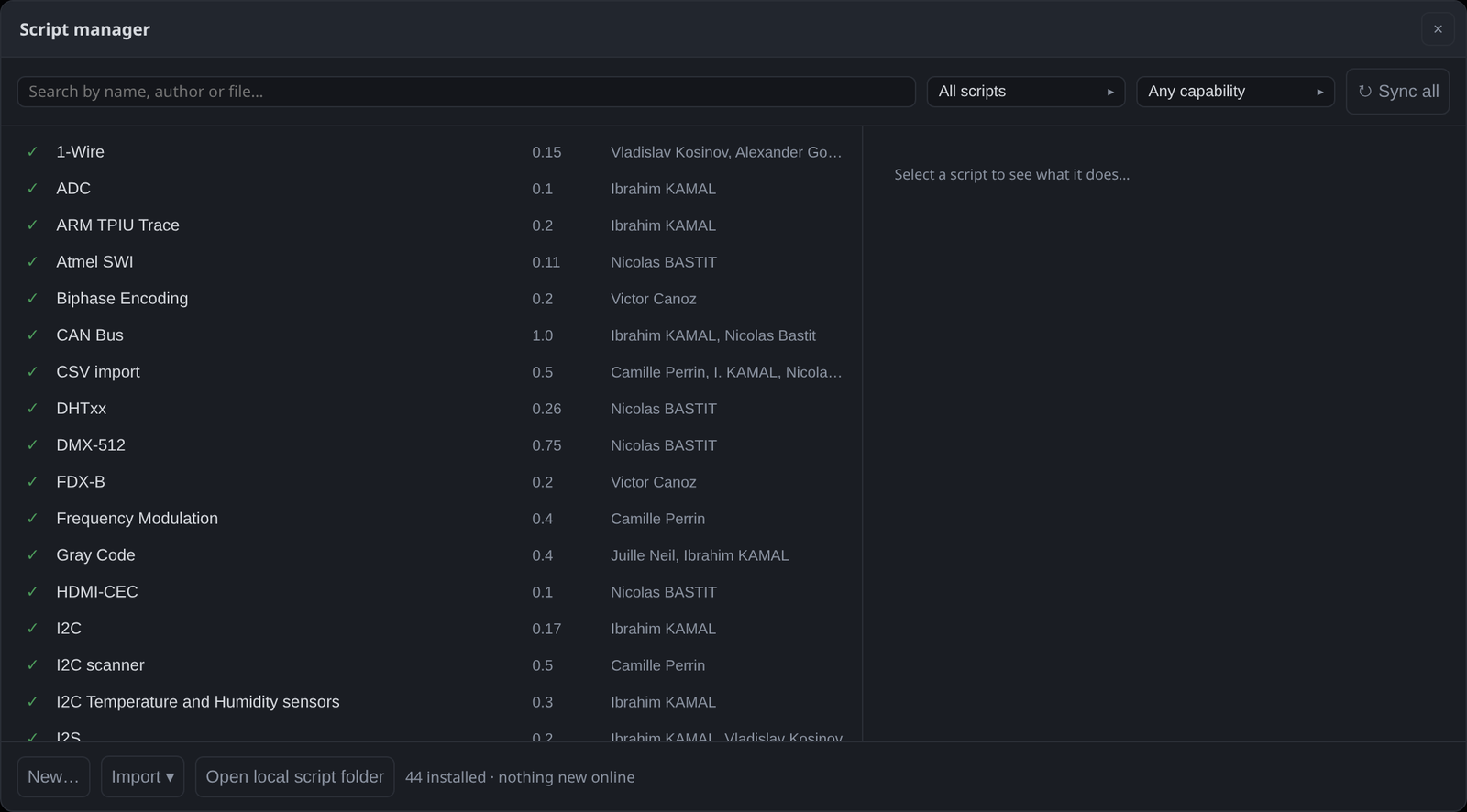
The list shows every script with its version and authors, and a check mark against the ones you have installed. Selecting one describes what it does. The search box matches name, author or file name, and the two filters narrow the list to installed or available scripts, and to a capability: that last one answers "which scripts can generate a pattern?" in one click.
Sync all fetches new scripts and updates from the online catalogue. The bar at the bottom says how many are installed and whether there is anything new.
Selecting an installed script also offers Enable direct file system access for this script. Scripts normally reach only the files chosen in their own configuration — a script is handed the name of its file field, never a path. The few that need to write somewhere of their own choosing, a logger for instance, need this tick box. ⚠️ A script with it can read and write anything you can, so leave it off unless the script asks for it. The permission belongs to the file name, so a renamed script or a copy starts without it.
New… creates a script from a template, which is the intended starting point for writing one. Import ▾ adds a file you already have. Open local script folder opens the directory the scripts are kept in, which is where to go when you edit one by hand. The folder can be moved under Settings ▸ Scripts, and the same tab chooses the editor scripts open in.
Updating
ScanaStudio checks the catalogue at start-up and offers updates in a banner. The check can be turned off under Settings ▸ Updates, separately from the check for new versions of the application itself.
When the computer cannot reach the internet, the scripts can be downloaded by hand from List of available protocol scripts and put in the local script folder, which the script manager opens for you.